Adjust for variables and activate any biasing paths that result
Source:R/adjustment_sets.R
control_for.RdAdjust for variables and activate any biasing paths that result
Usage
control_for(.tdy_dag, var, as_factor = TRUE, activate_colliders = TRUE, ...)

adjust_for(.tdy_dag, var, as_factor = TRUE, activate_colliders = TRUE, ...)

ggdag_adjust(
  .tdy_dag,
  var = NULL,
  ...,
  size = 1,
  edge_type = c("link_arc", "link", "arc", "diagonal"),
  node_size = ggdag_option("node_size", 16),
  text_size = ggdag_option("text_size", 3.88),
  label_size = ggdag_option("label_size", text_size),
  text_col = ggdag_option("text_col", "white"),
  label_col = ggdag_option("label_col", "black"),
  edge_width = ggdag_option("edge_width", 0.6),
  edge_cap = ggdag_option_proportional("edge_cap", 8, 10),
  arrow_length = ggdag_option("arrow_length", 5),
  use_edges = ggdag_option("use_edges", TRUE),
  use_nodes = ggdag_option("use_nodes", TRUE),
  use_stylized = ggdag_option("use_stylized", FALSE),
  use_text = ggdag_option("use_text", TRUE),
  use_labels = ggdag_option("use_labels", FALSE),
  label_geom = ggdag_option("label_geom", geom_dag_label_repel),
  unified_legend = TRUE,
  key_glyph = draw_key_dag_point,
  edge_engine = ggdag_option("edge_engine", "ggraph"),
  text = NULL,
  label = NULL,
  node = deprecated(),
  stylized = deprecated(),
  collider_lines = TRUE
)
Arguments
- .tdy_dag
A
tidy_dagittyordagittyobject- var
the variable(s) to adjust for. This can be a character vector of variable names or a list of the form
list(c(...)).- as_factor
Logical. Should the column be a factor?
- activate_colliders
logical. Include colliders activated by adjustment?
- ...
additional arguments passed to
tidy_dagitty()- size
A numeric value scaling the size of all elements in the DAG. This allows you to change the scale of the DAG without changing the proportions.
- edge_type
The type of edge, one of "link_arc", "link", "arc", "diagonal".
- node_size
The size of the nodes.
- text_size
The size of the text.
- label_size
The size of the labels.
- text_col
The color of the text.
- label_col
The color of the labels.
- edge_width
The width of the edges.
- edge_cap
The size of edge caps (the distance between the arrowheads and the node borders).
- arrow_length
The length of arrows on edges.
- use_edges
A logical value. Include a
geom_dag_edges*()function? IfTRUE, which is determined byedge_type.- use_nodes
A logical value. Include
geom_dag_point()?- use_stylized
A logical value. Include
geom_dag_node()?- use_text
A logical value. Include
geom_dag_text()?- use_labels
A logical value. Include a label geom? The specific geom used is controlled by
label_geom.- label_geom
A geom function to use for drawing labels when
use_labels = TRUE. Default isgeom_dag_label_repel. Other options includegeom_dag_label,geom_dag_text_repel,geom_dag_label_repel2, andgeom_dag_text_repel2.- unified_legend
A logical value. When
TRUEand bothuse_edgesanduse_nodesareTRUE, creates a unified legend entry showing both nodes and edges in a single key, and hides the separate edge legend. This creates a single, more compact legend. Default isTRUE.- key_glyph
A function to use for drawing the legend key glyph for nodes. If
NULL(the default), the glyph is chosen automatically based on theunified_legendsetting. When provided, this overrides the automatic selection. Common options includedraw_key_dag_point,draw_key_dag_combined, anddraw_key_dag_collider.- edge_engine
The engine used to draw edges. Either
"ggraph"(default) or"ggarrow". When"ggarrow", edges are drawn using ggarrow geoms, which support additional customization via thearrow_head,arrow_fins,arrow_mid, andcurvatureglobal options (seeggdag_options_set()).- text
The bare name of a column to use for
geom_dag_text(). Ifuse_text = TRUE, the default is to usename.- label
The bare name of a column to use for labels. If
use_labels = TRUE, the default is to uselabel.- node
Deprecated.
- stylized
Deprecated.
- collider_lines
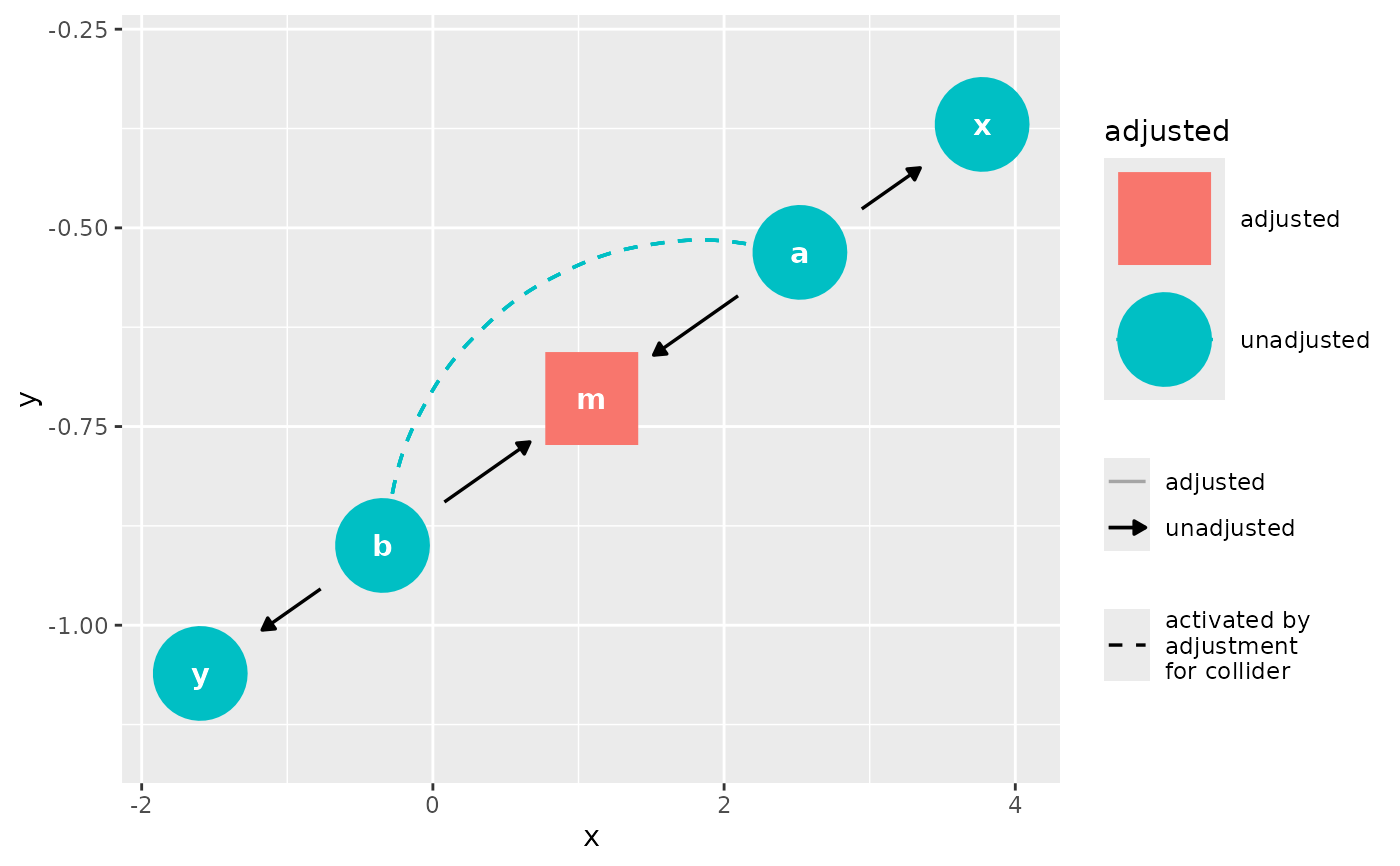
logical. Should the plot show paths activated by adjusting for a collider? These paths are drawn as dashed ggraph curves whatever
edge_engineis in use: they mark an association rather than an edge of the DAG, so they stay visibly apart from the arrows the engine draws.
Value
a tidy_dagitty with a adjusted column for adjusted
variables, as well as any biasing paths that arise, or a ggplot
Edge layers of the composite plotters
The plotters that color or fade edges by an analysis column build their edge
layers themselves, and which layers they build is settled from the DAG they
are called with: a DAG with no bidirected edge is given no bidirected edge
layer. Replacing the data of the returned plot afterwards, with ggplot2's
%+%, does not bring a layer back, so a plot built for one DAG is not a
template for another.
Examples
dag <- dagify(m ~ a + b, x ~ a, y ~ b)

control_for(dag, var = "m")
#> # DAG:
#> # A `dagitty` DAG with: 5 nodes and 4 edges
#> # Paths opened by conditioning on a collider: a <-> b
#> #
#> # Data:
#> # A tibble: 8 × 9
#>   name         x         y direction to        xend      yend collider_line
#>   <chr>    <dbl>     <dbl> <fct>     <chr>    <dbl>     <dbl> <lgl>
#> 1 a      1.44    -2.95e-10 ->        m     -0.00334 -6.27e-10 FALSE
#> 2 a      1.44    -2.95e-10 ->        x      2.71     4.78e-10 FALSE
#> 3 b     -1.45     3.25e-12 ->        m     -0.00334 -6.27e-10 FALSE
#> 4 b     -1.45     3.25e-12 ->        y     -2.70     4.41e-10 FALSE
#> 5 m     -0.00334 -6.27e-10 NA        NA    NA       NA        FALSE
#> 6 x      2.71     4.78e-10 NA        NA    NA       NA        FALSE
#> 7 y     -2.70     4.41e-10 NA        NA    NA       NA        FALSE
#> 8 a      1.44    -2.95e-10 <->       b     -1.45     3.25e-12 TRUE
#> # ℹ 1 more variable: adjusted <fct>
#> #
#> # ℹ Use `pull_dag() (`?pull_dag`)` to retrieve the DAG object and `pull_dag_data() (`?pull_dag_data`)` for the data frame
ggdag_adjust(dag, var = "m")